Spain
Spain Mexico
 Brazil
 Poland
 Taiwan
 Philippines
 South Korea

Four steps to your first payment
How a payment comes together
Eligibility and funding routes vary by card. Select a step to explore what to prepare.
Pick an existing payment and funding balance; compare with your current card.
Check residence, documents, exact plan, supported asset and network.
Save the receipt and settled debit; distinguish pending from usable rewards.
Subtract actual costs from confirmed rewards and assess funding and app convenience.
The essentials
- Compare only spending that can move to the card.
- Separate Bybit EU EUR funding from Nexo payment modes.
- Record final debits and usable rewards, not just authorizations.
Choose the payments worth moving first
Start with payments that are easy to inspect: a café purchase, groceries or a modest online order. Multiplying all monthly living costs by a cashback rate can overstate the opportunity. Rent paid by bank transfer, a utility direct debit and a card purchase are different transactions; one app does not automatically support all three. SEPA describes euro payment infrastructure, not a promise that every bill becomes an eligible card purchase.
Divide a month of spending into card purchases, account-based fixed bills and cash. Compare only the amount you could realistically move to the new card. Someone already holding USDC is evaluating a route for existing assets; someone earning EUR should also compare a card that spends those euros directly. These are different starting points, even when both people are considering exactly the same crypto card.
What separates Bybit EU and Nexo
Bybit EU is a useful candidate for understanding the link between an EUR Funding Account and card purchases. Price an EUR-funded purchase separately from one that converts crypto. An existing global Bybit account does not itself complete the EU card application. This is a comparison of how money reaches the purchase, not a ranking based on a headline reward.
With Nexo, decide between Debit and Credit before judging benefits. If you do not want debt, check the Debit setting and do not import Credit rewards into your Debit calculation. Living in Spain does not give everyone identical eligibility. Citizenship, residence and accepted identity documents matter together. A resident holding only a non-European passport should resolve the card requirements before transferring money merely to try the application.

Judge the first month by settled spending
For the first purchases, retain the receipt, the final app debit and the reward that is actually usable. An authorization shown immediately after checkout is not enough to settle the exchange-cost question; compare again once the transaction is complete. An USD-based card is not automatically advantageous for EUR purchases.
For illustration only, suppose €500 of eligible monthly purchases produces €10 in usable rewards, €6 in funding and exchange costs, and €3 in fixed monthly fees. The net benefit is €1. These are invented calculation inputs, not a card tariff or a payment test. Add any issuance and delivery costs to the first-year total. Increase spending only after seeing whether the same conditions hold for your next ordinary purchases.
From application to refund, by card
Compare against euro bank payments and direct debits. Use SEPA only with the provider’s EUR receiving details shown for your account; card spending and blockchain transfers are separate steps.
01Bybit EU CardIts EUR card and EUR funding balance make Spanish everyday spending straightforward to compare. Apply through a separate Bybit EU account.+
The tradeoff Crypto funding adds 0.9% conversion before applicable 0.5% FX; higher reward tiers carry extra conditions and caps.
Application conditions for this residence
Spanish addresses fall within the published EU residence scope. Nationality restrictions and separate card KYC still apply; obtain virtual approval before requesting a physical card.
Documents to prepare
- National ID, passport or accepted EEA/Swiss driving licence; residence permits need 6 months validity
- Spanish address proof issued within 3 months; VIP DHL delivery requires a tax ID
Application, funding and first use
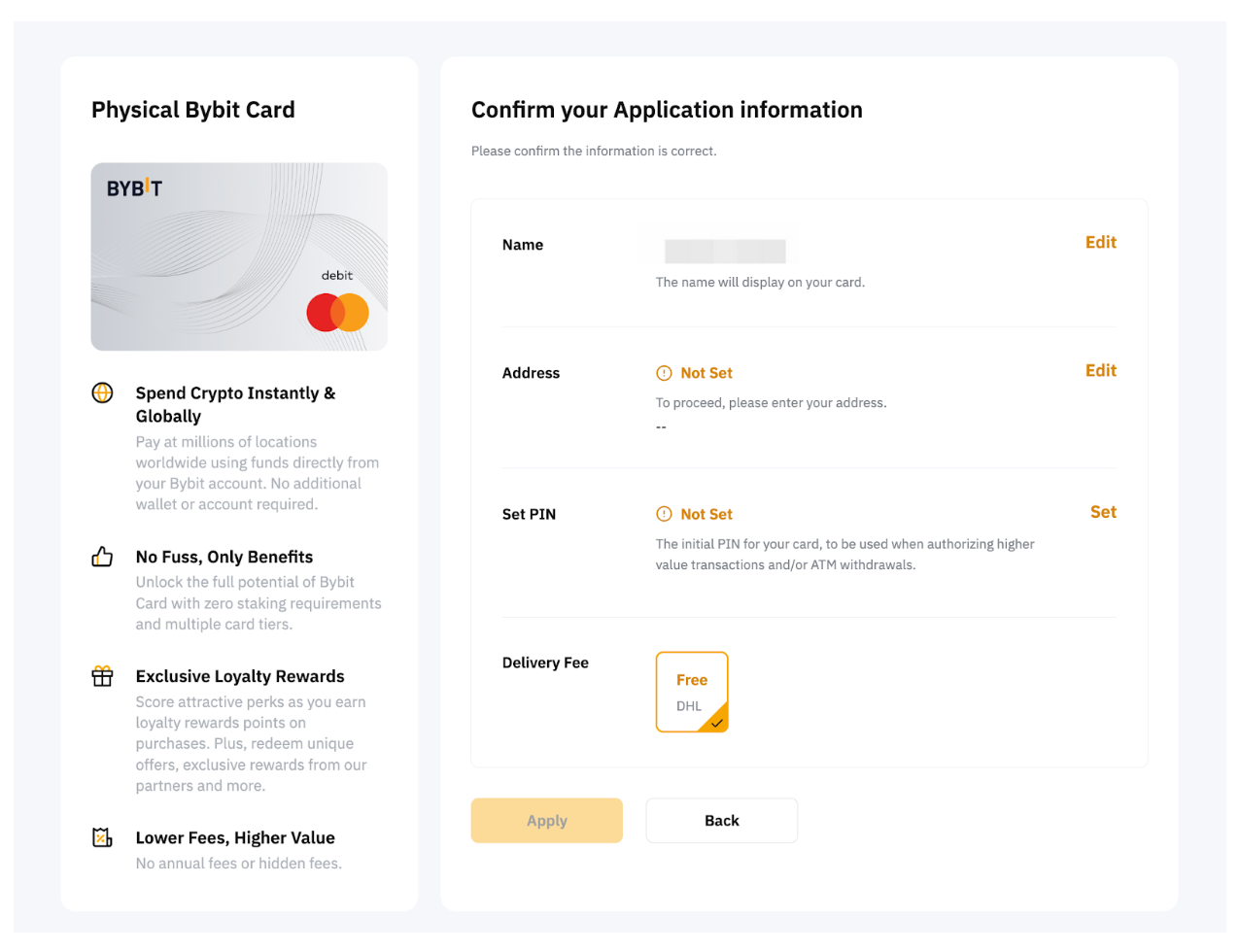
- On Bybit EU, choose Finance → Card → Get Your Card.
- Select residence and complete identity/address checks.
- Confirm your email, set up Google 2FA and submit.
- After virtual approval, apply separately for physical and confirm delivery/PIN.
Your first local-currency purchase
Fund EUR in the Funding Account and pay in EUR. Crypto-funded purchases can add conversion fees; installments are unsupported, and ATM withdrawals have separate fees and limits.
Cancellations, refunds and support
- Cancellations, refunds and support
- Request a completed purchase refund from the merchant. Authorization status means merchant capture is pending; funds can remain held for up to 30 days.
- How long does it take?
- Normally credited to the Funding Account within 2 business days. If extra documents are requested, submit through email instructions/Support Hub; review and credit are stated as within 2 working days after submission.
- Where is it returned?
- Returned in EUR to the Funding Account. It does not restore the original crypto quantity; points earned on the purchase may be deducted.
- Cancellation and subscriptions
- Discard a pending application using Discard My Card Application; terminate an issued card in Card Management. No card cancellation fee; cancel paid merchant subscriptions with the merchant separately.
- Declined or unfamiliar transactions
- Open Transaction History → Authorization → Details for the decline reason. Check Spending Power, Funding Account balance and limits; submit unresolved declines through the EU webform with transaction details.
- What to prepare for support
- Use the Bybit EU webform and Support Hub. For suspension, select General Usage Inquiry → My Bybit Card is suspended; include merchant, amount, timestamp and reference.
Official information · www.bybit.eu ↗
Official information · www.bybit.eu ↗
Official information · www.bybit.eu ↗
Official information · www.bybit.eu ↗
Official sources · 2026.09.08
Bybit EU official guidance ↗Bybit EU official guidance ↗
Bybit EU official guidance ↗
Current Bybit EU rewards table ↗
Activate auto cashback ↗
Card controls and security settings ↗
Making Bybit EU card payments ↗
Bybit EU card issuer disclosure — promotional rate not imported ↗
Bybit EU crypto-asset custody services ↗
Funding Account — separate Earn ownership terms ↗
How to Apply for a Bybit Card – Bybit EU ↗
Bybit Card EU ↗
02Nexo CardChoose EUR spending in Debit Mode or secured borrowing in Credit Mode. Select Debit Mode before paying if you do not want a loan.+
The tradeoff Debit Mode earns no cashback; physical issuance needs over $5,000 and Gold tier, while FX varies by region and day.
Application conditions for this residence
Conditional candidate: Spain and Poland are in the EEA, but Nexo checks citizenship/residence and a supported European-issued document. With only a non-European passport, resolve card eligibility with Client Care before funding.
Documents to prepare
- Passport, ID card or residence permit offered in the verification menu
- Card requires a supported EEA/UK/eligible-European-issued document; account KYC alone does not establish card eligibility
Application, funding and first use
- Create a Nexo account and verify with an eligible European identity document.
- Have at least $50 in your account for virtual activation.
- Open the app’s Card tab and choose Activate Card.
- For physical, hold over $5,000 and Gold tier or above, then order in Card.
Your first local-currency purchase
Send euros using your EUR Top Up details and check the EURx credit and deposit fee. Pay in EUR; money-transfer and cash-like merchant restrictions differ from ordinary shopping.
Cancellations, refunds and support
- Cancellations, refunds and support
- Ask the merchant first for a completed-purchase refund. Distinguish pending authorizations from settled charges; if the merchant refuses, keep refusal correspondence and receipts for a Client Care chargeback request.
- How long does it take?
- Official guidance makes timing merchant-dependent and publishes no fixed credit deadline. Obtain the merchant’s processing date and reference, then ask Client Care to trace an overdue refund.
- Where is it returned?
- Refunds are recorded in EURx or GBPx matching the initially selected card currency. For Credit Mode, inspect the refund and loan balance separately; do not assume automatic repayment.
- Cancellation and subscriptions
- Deactivate through Card → More → Deactivate card. Ask Client Care separately about account closure and outstanding borrowing; cancel paid merchant subscriptions directly with the merchant.
- Declined or unfamiliar transactions
- Check available balance or collateral capacity for the selected Debit/Credit Mode and card deactivation. For restricted money-transfer/cash-like merchants, avoid repeated retries; send timestamp, amount and merchant to Client Care.
- What to prepare for support
- Use the Help Center’s 24/7 Client Care or Contact form. Include refund-refusal evidence, receipts and transaction reference, clearly identifying a card-purchase dispute.
Official information · support.nexo.com ↗
Official information · support.nexo.com ↗
Official information · support.nexo.com ↗
Official information · support.nexo.com ↗
Official information · support.nexo.com ↗
Official sources · 2026.09.08
Nexo official guidance ↗Nexo official guidance ↗
Nexo official guidance ↗
Nexo official guidance ↗
Nexo EEA custody setup ↗
Funding and choosing Nexo Card mode ↗
Nexo card cashback eligibility ↗
Nexo EEA Card — issuer legal disclosure ↗
How can I order the Nexo Card ↗
Nexo Registration ↗
Compare the cards in this story
| CARD PROFILE | Rewards · first band | Foreign-currency fee | Maintenance / subscription |
|---|---|---|---|
| Bybit EU Card | Base 1%; no monthly cap | 0.5% non-EUR + 0.9% crypto conversion | No annual card fee |
| Bybit EU Card · Base eligible spend earns 1% without a monthly cap. Higher 2–10% tiers have conditions and caps. Crypto-funded spending adds 0.9% conversion plus applicable FX. | |||
| Nexo Card | 0% Debit Mode | 0.2–2.5% by region/day | No card annual fee |
| Nexo Card · Credit Mode rewards are separate. FX is 0.2% weekdays/0.7% weekends in EEA/UK/Switzerland, or 2%/2.5% elsewhere. | |||
Fee and reward sources
EU fees and limits ↗Current reward tiers ↗
Rewards FAQ ↗
Official terms · 2026-09-08 ↗
Card fees, modes and eligibility ↗
Issuance and limits ↗
Official terms · 2026-09-08 ↗
Published terms for these plans. Read the card profiles for caps, reward forms and other costs.
Compare cards ↗Official sources
An editorial guide based on official materials, not a report of a payment test or an individual approval.
Official sources · 18
Nexo: Card eligibility and payment modes ↗European Central Bank: Single Euro Payments Area ↗
ether.fi: Identity verification requirements ↗
ether.fi: Card currency, FX fees and refunds ↗
ether.fi: Direct Pay, Borrow Mode and refunds ↗
Bybit EU official guidance ↗
Bybit EU official guidance ↗
Bybit EU official guidance ↗
Nexo official guidance ↗
Nexo official guidance ↗
Nexo official guidance ↗
Official information · www.bybit.eu ↗
Official information · www.bybit.eu ↗
Official information · support.nexo.com ↗
Official information · support.nexo.com ↗
Official information · support.nexo.com ↗
Official information · support.nexo.com ↗
Official information · support.nexo.com ↗